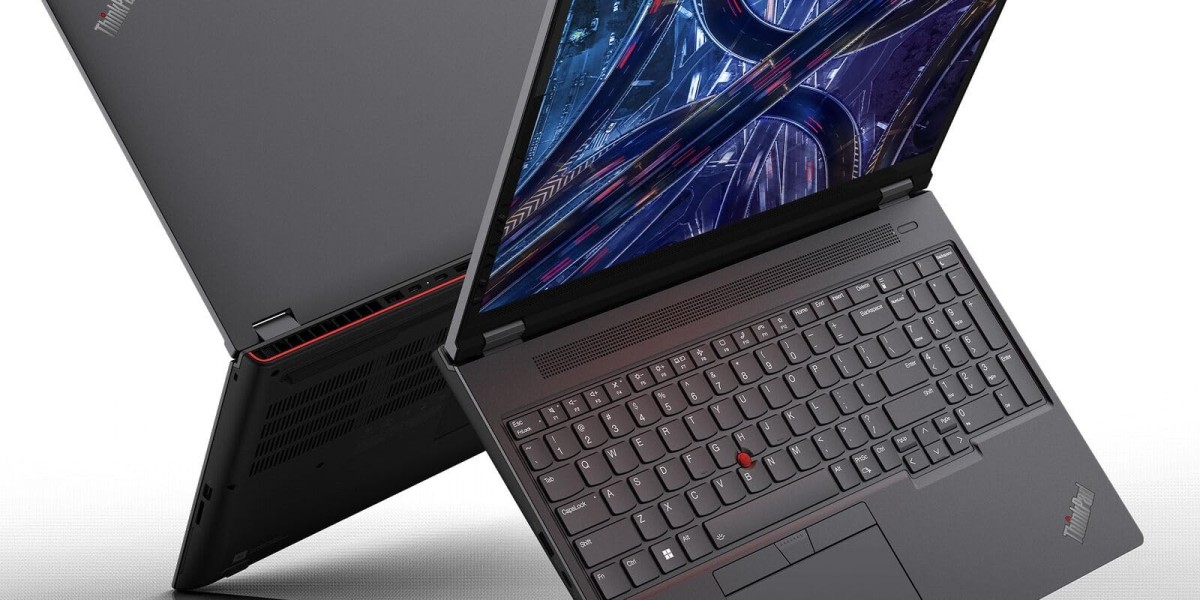

If you design, render, model, or code for a living, your laptop is more than a tool; it's your entire studio. That's exactly the audience Lenovo is chasing with the Lenovo ThinkPad P16 Gen 2, a 16-inch mobile workstation built to shrug off CAD files, 3D renders, and AI workloads that would bring a regular laptop to its knees.
In this guide, you'll learn everything you need to know before buying: full specifications, real-world performance, display quality, battery life, build quality, and how it stacks up against a very different kind of 16-inch machine, the Samsung Galaxy Book5 Pro. We'll also cover pros and cons, frequently asked questions, and who this laptop is actually built for.
What Is the Lenovo ThinkPad P16 Gen 2?
The ThinkPad P16 Gen 2 is Lenovo's flagship mobile workstation, sitting at the top of the ThinkPad P-series lineup above the lighter P16v and P16s models. It's aimed squarely at engineers, architects, video editors, 3D artists, and data scientists who need desktop-class performance in a laptop chassis, even if that means sacrificing portability.
Unlike a typical gaming laptop that prioritizes flashy design and high refresh rates for entertainment, the P16 Gen 2 is built around ISV (Independent Software Vendor) certification for professional software like AutoCAD, SolidWorks, and Adobe's creative suite, where stability matters just as much as raw speed.
Lenovo ThinkPad P16 Gen 2: Key Specifications
Here's a breakdown of what you can configure on the ThinkPad P16 Gen 2:
Processor: 13th and 14th Gen Intel Core HX-series chips, up to Core i9-13980HX or i7-14700HX, with Intel vPro support for enterprise management
Graphics: NVIDIA RTX Ada Generation lineup, ranging from the entry-level RTX 1000 Ada up to the powerful RTX 5000 Ada, with GPU power configurable up to 130W TGP
Memory: Up to 192GB of DDR5 RAM, ideal for memory-hungry 3D and simulation software
Storage: Dual-drive support with up to 8TB of SSD storage
Display: A 16-inch, 16:10 panel available in several flavors FHD+ (1920×1200) IPS, QHD+ (2560×1600) IPS at up to 165Hz, 4K+ (3840×2400) IPS, and a 4K+ OLED option
Build: A magnesium-aluminum chassis using recycled materials, including recycled aluminum on the lid and recycled magnesium on the keyboard deck
Ports: Two Thunderbolt 4 ports, a 10Gbps USB-C port, two USB-A ports, HDMI 2.1, a 3.5mm audio jack, and optional SmartCard and SD card readers
Connectivity: Wi-Fi 6E and Bluetooth 5.3 standard, with optional NFC and 4G WWAN with eSIM
Weight and size: Around 6.5 pounds and roughly 1.2 inches thick, noticeably larger and heavier than most ultrabooks and even many gaming laptops
Warranty: Three-year manufacturer warranty included as standard
Pricing starts around $1,850 for base configurations and can climb past $5,000 for models loaded with top-tier RTX Ada graphics and high-resolution displays.
Performance: Where the ThinkPad P16 Gen 2 Shines
This is where the P16 Gen 2 earns its "workstation" label. Independent testing shows that with the 130W RTX 4000 Ada graphics option, it ranks among the fastest 16-inch workstations Lenovo offers, comfortably outperforming rivals in GPU-heavy benchmarks like SPECviewperf, LuxMark, and OctaneBench tools used to measure real-world 3D rendering and CAD performance.
That performance does come with trade-offs. Reviewers note the laptop runs warmer and louder than average under sustained load, and the GPU can throttle by roughly 10% after several minutes of heavy stress, suggesting the cooling system isn't quite built to sustain peak output indefinitely. Battery life is also short, expect just a few hours away from the outlet, which is typical for workstation-class hardware but worth planning around if you travel often.
On the CPU side, competitors like HP's ZBook Power G11 have shown an edge in CPU-focused benchmarks, while the ThinkPad pulls ahead decisively whenever the GPU is doing the heavy lifting. In other words: if your workflow leans on GPU rendering, AI inference, or CAD viewport performance, the P16 Gen 2 is built for you.
Design, Keyboard, and Display
The ThinkPad P16 Gen 2 doesn't try to hide what it is: a large, heavy-duty tool built for the desk, not the coffee shop. Reviewers consistently describe it as significantly bigger than its "v" sibling, the ThinkPad P16v, and even bulkier than most gaming laptops on the market.
What you get in exchange is one of the best keyboards in the business. The full-size layout includes a numpad, the signature red TrackPoint, and satisfying key travel that ThinkPad fans have loved for decades. The white backlighting is a nice touch for dim studio environments.
Display options are genuinely flexible. The QHD+ IPS panel running at 165Hz is a sensible middle ground for creators who want both sharpness and smoothness, while the 4K+ options, including OLED, cater to colorists and photo editors who need maximum detail. That said, some testers found factory color calibration inconsistent even with Lenovo's included X-Rite Color Assistant utility, so professionals doing color-critical work may want to calibrate manually.