
Old business systems rarely disappear cleanly. They linger in the background, holding customer records, financial histories, contracts, case files, reports, and years of operational data. The software may no longer be useful, but the information inside it still matters. That is why many organizations are turning to Docbyte's Application Retirement to safely retire outdated systems while keeping important data accessible, compliant, and protected.
Why Old Systems Become a Business Risk
Every business has at least one system nobody wants to touch. It might be an old finance platform, a legacy HR database, a document management tool, or a custom application built years ago by people who no longer work there. It still runs, technically. But it is expensive, slow, hard to maintain, and risky to keep alive.
The problem is not just age. The real issue is dependency. Teams may need historical data for audits, legal discovery, customer service, reporting, or compliance. So the business keeps the old application running “just in case.” That sounds safe, but it often creates the opposite result.
Legacy systems can increase security exposure because many are no longer fully supported. Updates become rare. Integrations break. User access becomes harder to control. Documentation disappears. The system becomes a quiet liability sitting inside the IT environment.
According to IBM’s 2025 Cost of a Data Breach Report, the global average cost of a data breach reached $4.44 million. IBM also found that organizations took an average of 241 days to identify and contain a breach. That is a long time for exposed data to create damage.
Old systems also drain money. A 2025 Pegasystems study reported that the average global enterprise wastes more than $370 million every year because of technical debt and outdated legacy systems. That number is extreme, but the principle applies to businesses of all sizes. Keeping outdated systems alive is rarely free. It consumes licensing costs, infrastructure, support hours, security monitoring, and employee patience.
At some point, the smarter move is not to maintain the system. It is to retire it properly.
What Application Retirement Actually Means
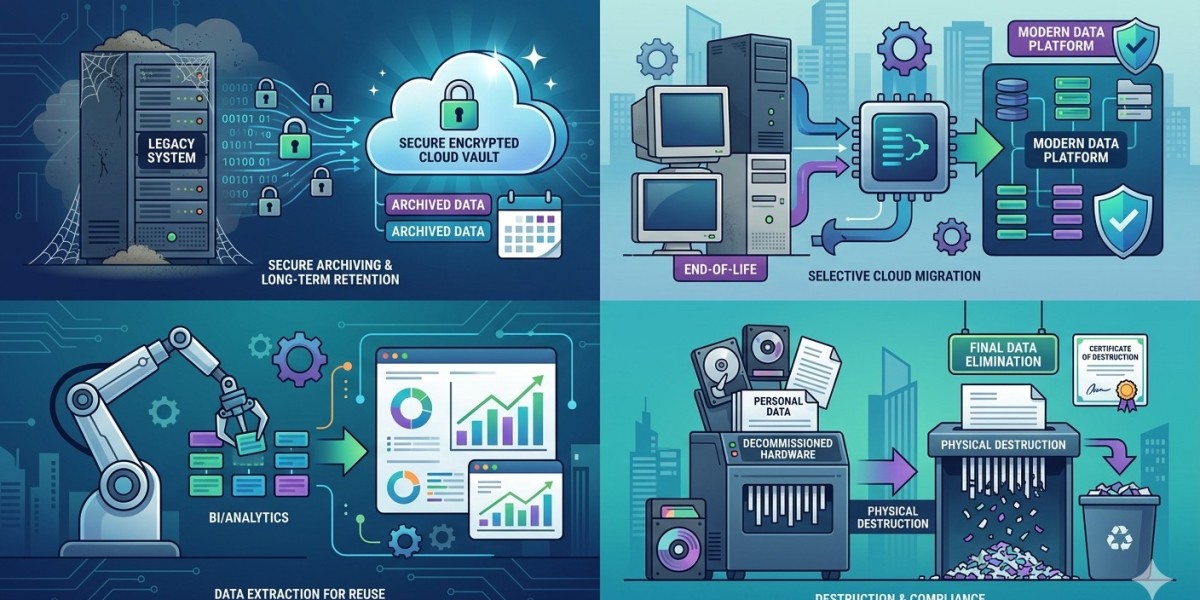
Application retirement does not mean deleting everything and hoping nobody asks questions later. That would be reckless. It means extracting valuable data from an old system, preserving it in a secure archive, and shutting down the original application once the business no longer needs it for daily operations.
This approach gives companies two outcomes at once. They reduce the cost and risk of running outdated software, while still keeping access to the records they need.
A proper retirement process usually includes several steps. First, the business identifies which systems are no longer actively needed. Then it maps the data inside those systems. This includes structured data, documents, metadata, audit trails, and records linked to customers, employees, projects, cases, or transactions.
Next comes data cleansing and classification. Not every record deserves the same treatment. Some data must be kept for legal or regulatory reasons. Some can be disposed of based on retention rules. Some needs restricted access. Some may need to remain searchable for business users.
Then the data is moved into a secure archive where it can be searched, retrieved, governed, and retained according to policy. This is where Docbyte's Application Retirement becomes valuable. Instead of forcing businesses to keep old software running just to view historical records, it helps preserve the information in a controlled environment.
This matters because digital transformation often fails when companies ignore the past. New systems may look modern, but old data still needs a responsible home. If historical records are scattered, inaccessible, or trapped in unsupported tools, the business has not really modernized. It has just moved the mess to another corner.
Gartner has reported that only 48% of digital initiatives meet or exceed business outcome targets. One reason is that modernization is not just about launching new platforms. It is about reducing complexity, managing data properly, and removing the systems that slow the business down.
How to Retire Old Systems Without Creating Data Risk
The safest way to retire an application is to treat the project as a governance initiative, not just an IT cleanup task. The goal is not simply to shut something down. The goal is to preserve value while removing risk.
Start with an application inventory. List every system that is outdated, duplicated, unsupported, expensive, or used only for historical lookup. Include owners, users, data types, integrations, licenses, and compliance obligations. This helps the business avoid emotional decision-making. Some old systems are genuinely critical. Others are digital clutter wearing a badge.
Next, define retention rules. Different records have different lifespans. Financial records, employee files, medical data, legal contracts, and customer communications may all have separate retention requirements. Deleting too early can create legal risk. Keeping everything forever can create privacy and security risk.
Access control is another major priority. When legacy data moves into an archive, permissions should not be copied blindly. Old access models are often messy. Former employees may still exist as users. Shared admin accounts may still be active. Sensitive records may be visible to people who no longer need them. Application retirement is a good moment to clean that up.
Searchability also matters. Archived data is only useful if authorized users can find what they need. A finance team may need old invoices. A legal team may need contracts. A customer support team may need historical account data. The archive should make retrieval simple without reopening the old application.
Docbyte's Application Retirement supports this safer model by helping businesses keep historical data accessible while reducing dependency on aging software. That balance is the whole point. You do not want to lose business memory. You also do not want to keep risky systems alive forever.
Conclusion
Old systems are not harmless just because they still work. They can carry hidden costs, security gaps, compliance problems and operational friction. The longer a business waits, the more complicated retirement becomes.
A smarter application retirement strategy helps companies reduce risk without losing valuable historical data. It preserves records, improves governance, simplifies IT environments, and supports future modernization.
For organizations still maintaining outdated systems only because the data inside them is important, Docbyte's Application Retirement offers a practical path forward. The goal is not to erase the past. The goal is to preserve it safely, then stop paying for software that no longer earns its place.